Jujutsu (jj) GUI
Ukemi
A visual interface for Jujutsu (jj) in VS Code.
In judo, ukemi is the art of falling safely. With jj and undo, every change is safe to try.
Features
Change graph
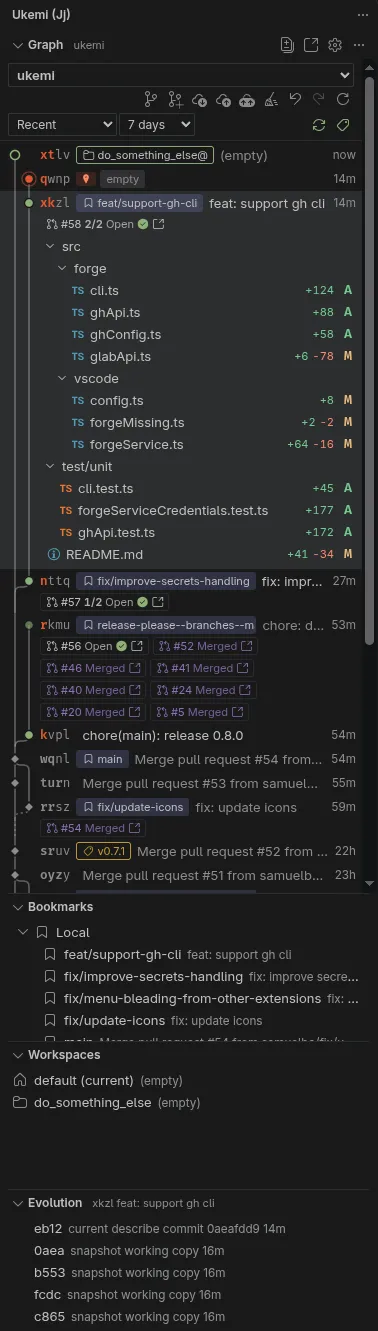
See changes, bookmarks, tags, workspaces and conflicts. The working copy has a red seal. Filter by Recent, Mine, My history, Stack or Working copy (the working copy and its last 5 first parents), and set the history depth. Recent also shows the last 10 commits on the trunk. Changed files appear as a list or a tree.
Drag and drop
Drag a change onto another to rebase it with its descendants. Hold Alt to move only that change, Ctrl to duplicate it, or Ctrl and Alt to duplicate it with its descendants. Drag a file to move its changes, or hold Ctrl to copy them. Drag a bookmark to move it.
Edit history
Describe, create, edit, squash, split, abandon, duplicate and revert from the change. Rebase onto the trunk or another change, or insert the change before or after another. Ship to Trunk Now moves the trunk bookmark and pushes it. Start a new working copy on the trunk, or on a bookmark, request or revision. When a local bookmark and a remote bookmark share a name, Ukemi asks which one to use.
Bookmarks
List local and remote bookmarks, and filter them by name. Open, edit, rename, delete, forget, track, untrack or push a bookmark. Start a pull or merge request, or a new workspace, from the menu.
Workspaces
Open a workspace in this window or a new one. Open a terminal, refresh it, reveal it in the graph, or start a new change in it.
Split by hunks
Select hunks in a split editor. Those hunks go into a new change before the original. You can also split by files.
Evolution
Follow each amend, describe, snapshot and rebase of the selected change. Click a version to see what it changed, compare it with the current version, or restore its files.
Diffs
Click a file to see its diff. Source Control shows the working copy when the Git extension does not. An optional editor-title button opens the jj diff.
Sync
Fetch, push the current bookmark, push all bookmarks, undo and redo from the toolbar. Auto fetch stays off until you turn it on. SSH uses your agent. HTTPS uses your git credential helper, then your GitHub or GitLab sign-in.
Pull and merge requests
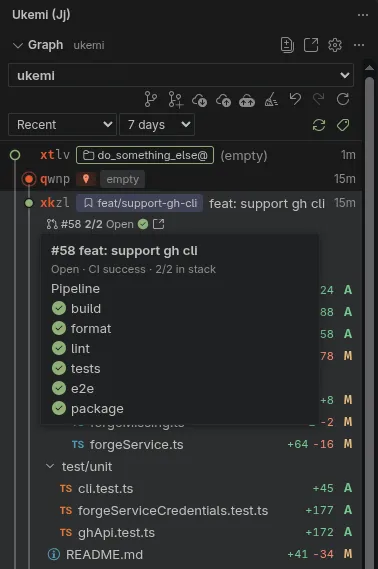
Create a GitHub pull request or a GitLab merge request from a change. The proposed target is the parent bookmark, so the next request in a stack points at the one below it. Hover a request to see its jobs, then merge and clean up.
Stacked requests
Requests that build on each other show their position, such as 2/3, next to the request number. Sync Stack pushes the bookmarks and points each request at the one below it, or at the trunk once that one is merged. On GitHub, synced stacks also appear in GitHub's stack view. Rebase Stack onto Trunk rebases the whole stack and offers to sync it.
Clean up
Review merged and conflicted bookmarks, deleted remote bookmarks, workspaces that are not open, and divergent changes, then apply the selection.
Many repositories
Ukemi finds repositories in subfolders. When it finds more than one, pick it in the dropdown. It follows the active editor.
No setup
When jj is missing, Ukemi downloads the official static release and checks its SHA-256 digest. That binary can be added to PATH in integrated terminals.
Requirements
Linux, tested on Ubuntu 24.04 and Fedora 44. jj 0.40 or later. Ukemi downloads jj 0.46 when you agree.